Free · No signup · PDF download
PDF Invoice Generator – Create and Download Invoice PDFs Free
Turn invoice details into a clean, A4 PDF you can send, print or file. The document is built in your browser as real text, not a screenshot, and costs nothing.
- Real vector text, not a screenshot
- A4 layout with clean page breaks
- Logo, every currency, tax and discount
- Instant PDF download, no account
Online PDF Invoice Generator
Fill in the invoice below — totals calculate as you type — then click Download PDF. The PDF is built in your browser as real text on an A4 page. Nothing you type is sent to us.
Download or print
Invoice settings
 Create invoices regularly?
Invoices, receipts, quotations and waybills on your phone.
Get the Android app| $0.00 |
- No signup or login
- Instant PDF download
- Processed in your browser
- Free, with no invoice limit
01
Why PDF is the right format for an invoice
An invoice is a document that other people file, forward and print. PDF is the only common format that survives all three without changing.
- It looks identical everywhere. A Word file re-flows when the recipient does not have your font. A PDF embeds everything it needs, so the layout your customer sees is the one you approved.
- It cannot be edited by accident. Nobody can drag a cell and change a total while scrolling. That matters when the document is a request for money.
- It prints predictably. The page size, margins and page breaks are fixed in the file rather than decided by the recipient’s printer settings.
- Accounts systems expect it. Most invoice-processing and bookkeeping tools accept PDF attachments directly, and many read text out of them automatically.
02
How this PDF invoice generator works
When you choose Download PDF, your browser lays the invoice out on an A4 page and writes the file. Nothing is sent anywhere.
The page is laid out in millimetres
A4 with 15 mm side margins: your logo and business details top left, the word INVOICE and the invoice number, dates and currency top right.
From and Bill To sit side by side
Two columns under a rule, so the reader can see at a glance who is billing and who is billed.
The item table is drawn to fit
Long descriptions wrap rather than overflow, each row grows to fit its content, and the header row repeats if the table runs onto another page.
Totals are boxed at the bottom right
Subtotal, discount, tax and any delivery charge, then the total in a highlighted box with the currency code beside it — useful when you invoice internationally.
The file is named after your invoice
Invoice number
INV-014producesinvoice-INV-014.pdf. The number is sanitised first, so an unusual character cannot produce an invalid filename.
Standard PDF fonts do not contain every currency symbol. Where a symbol such as ₦ or ₹
is not available, the PDF prints the three-letter ISO code instead — NGN 45,000.00
rather than a missing glyph. It is unambiguous, and it is what most international invoices do
anyway. The total line also names the currency explicitly.
03
Printing the invoice instead
Print invoice uses a dedicated print stylesheet: navigation, buttons, settings and every marketing section are removed, the input boxes lose their borders and only the document itself goes to the printer. Notes and terms expand to their full height first, so nothing is clipped. It is also the fastest way to save a copy if you would rather use your browser’s own “Save as PDF” option.
04
Sending the PDF to a customer
- Attach the PDF rather than pasting the invoice into the body of an email — attachments get filed, email text gets lost.
- Put the invoice number and the amount in the subject line so it can be found again later.
- Send it to the accounts address if the customer has one, and copy your day-to-day contact.
- Keep your own copy. The PDF you send is the record of what you asked for.
More on this in how to send an invoice to a client.
Create and share invoice PDFs from your phone
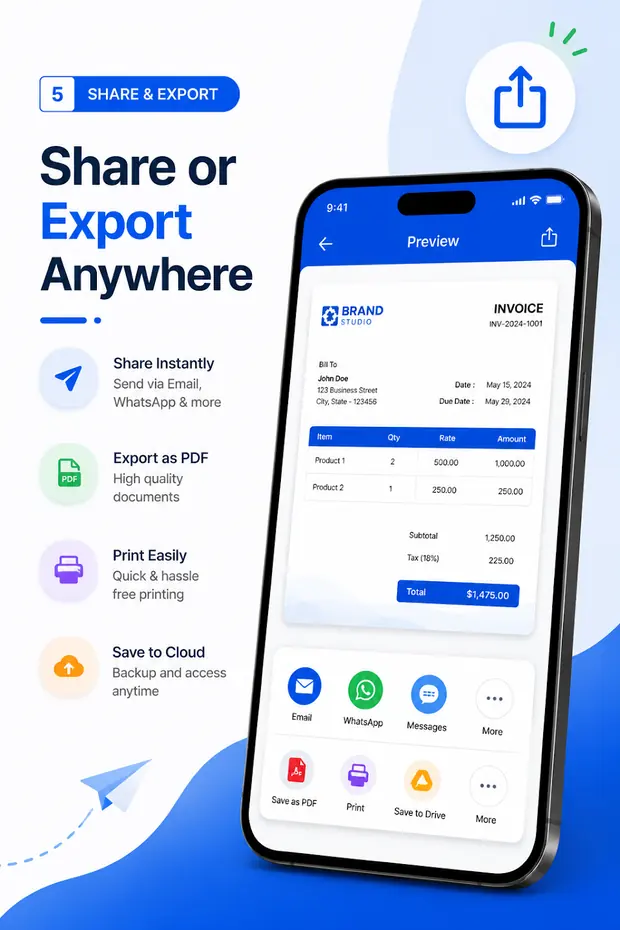
Invoice & Quotation Generator exports the same kind of document on Android and shares it straight to email or a messaging app — useful when you finish a job on site and want the invoice out before you leave.
- PDF export for invoices, receipts, quotations and waybills
- Share directly from the app, or print
- Customer and business details saved for next time
- Free, with no document limit
Make the document now
Free invoice, receipt, quotation and waybill tools
Every tool runs in your browser with no signup and downloads an A4 PDF. Your business details are kept in this browser and shared between them.
Free tool
Free invoice creator
Invoices with tax, discount, logo and every currency, as an A4 PDF.
Free tool
Receipt maker
Payment method, amount received, balance due and a PAID stamp.
Free tool
Quotation maker
Valid-until date, deposit to proceed, scope and terms.
Free tool
Waybill maker
Sender, receiver, carrier, packages and weight for a delivery.
Free tool
Bill generator
Itemised bills for shops, restaurants and services.
Free tool
Tax invoice generator
GST, VAT or sales tax as its own line, per invoice or per item.
Free tool
Invoice templates (Word)
Six editable .docx invoice layouts to download.
Free tool
Android app
Invoices, receipts, quotations and waybills on your phone.
FAQ
PDF invoice questions
How do I generate an invoice as a PDF?
Fill in the invoice creator and choose Download PDF. The PDF is assembled in your browser and saved straight to your device — there is no upload step and no email required.
Is the PDF a picture of the screen?
No. The invoice is drawn into the PDF as vector text, so it stays sharp at any zoom level, prints at full resolution and the text inside it can be selected, copied and searched. Tools that screenshot the page produce a blurry image that a customer cannot copy an account number out of.
What paper size is the PDF?
A4 (210 × 297 mm) with 15 mm side margins. That prints correctly on A4 and scales onto US Letter without cutting content off.
What happens if my invoice has many line items?
The table continues onto as many pages as it needs. The column headings repeat at the top of each page, rows are never split down the middle, and once there is more than one page each page is numbered and carries the invoice number.
Will my logo appear in the PDF?
Yes. The logo you upload is resized in your browser and placed at the top left of the PDF, keeping its aspect ratio. PNG transparency is preserved.
Can I create the PDF on my phone?
The web tool works in a mobile browser. For regular use, Invoice & Quotation Generator exports PDFs on Android and lets you share them straight to email or a messaging app.