Free Quotation Software: Web and Android, No Licence
Quotation software that does the arithmetic instead of leaving it to you — numbering, validity dates, tax, deposits and the PDF. Free in the browser, free on Android, no per-document charge.
- No signup or login
- Instant PDF download
- Processed in your browser
- Free, with no invoice limit
Most businesses looking for quotation software are not looking for a CRM. They are looking for a way to stop rebuilding the same document in Word, getting the VAT line wrong at half past nine at night, and emailing a file the customer can edit.
That is a narrow problem and it does not need a subscription. Here is what this does, what it deliberately does not do, and how the browser version and the Android app differ.
Honest comparison
Browser version or Android app?
They produce identical PDFs. The difference is where the work happens.
| Feature | Browser (this site) | Android app |
|---|---|---|
| Install | Nothing to install | Free from Google Play |
| Works on | Windows, Mac, Linux, iPhone, Android | Android phones and tablets |
| Offline | Needs the page to load first | Yes — created and stored on the phone |
| Saves past quotations | Your details only, in this browser | Yes — a document list you can reopen |
| Quote → invoice | Re-enter on the invoice creator | Same app, details carried over |
| Cost | Free, unlimited | Free, unlimited |
| Best for | Office desk, shared or locked-down computers | Site visits, vans, trade counters, no signal |
If you quote from a desk, stay in the browser. If you quote where the work is, install the app.
What it actually does
The parts worth having
Everything here exists because doing it by hand goes wrong.
Totals that cannot drift
Subtotal, discount, tax and deposit recalculate on every keystroke. The most common defect in a hand-built quote is a total that no longer matches its lines after a late edit.
Validity dates
Set 30 days and the valid-until date is written out in full. A date is enforceable in a way that “valid for 30 days” on an undated document is not.
Deposit arithmetic
Set a percentage and the deposit figure appears on the quotation, so the customer agrees to it at the same moment they agree to the price.
Your details, remembered
Entered once, reused on every later quotation in that browser or on that phone. This is the whole saving, repeated weekly.
Every currency
Pick the currency and it follows the figures into the PDF — useful when you quote in one currency and invoice in another.
A PDF, not a document
The customer receives something they cannot edit and that prints the same everywhere. Keep the editable version yourself.
What this is not
Worth saying plainly, so you do not install it and find a gap. There is no customer database, no pipeline or follow-up reminders, no e-signature, no accounting integration, no multi-user accounts, and no analytics on whether a quote was opened.
If you need those, you need a quoting platform with a monthly fee, and you should buy one. If what you need is a correct, professional quotation produced in three minutes and sent as a PDF, that is what this does, and the absence of everything else is why it is free and why there is nothing to learn.
Free, in your browser
Quotation Software, in the Browser
No account, no install, no document limit. Fill it in, download the PDF. Your details stay in this browser for the next quotation.
Online Quotation Generator
Fill in the quotation below — your details, the customer, the items and the price — then download the PDF or print it. This online quote maker calculates the totals, tax and any deposit for you, and nothing you type is sent to us.
Download or print
Quotation settings
 Quote on site, invoice when done?
Quotations, invoices, receipts and waybills on your phone, with your details saved.
Get the Android app| $0.00 |
The same software on Android, offline
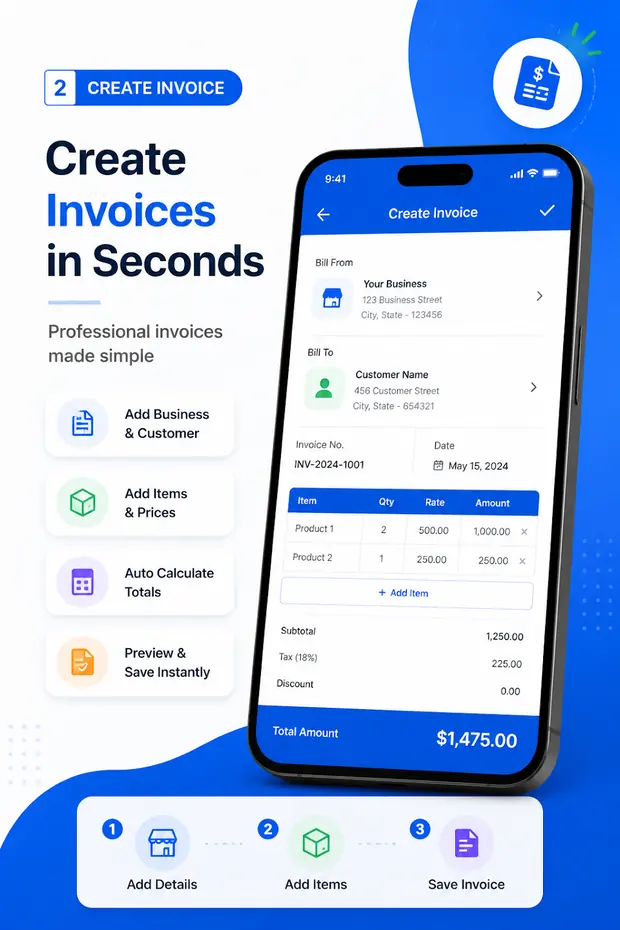
Invoice & Quotation Generator is the download if you quote away from a desk. Quotations, invoices, receipts and waybills in one free app, stored on the phone, no signal required.
- Free on Google Play, no subscription
- Works with no data connection
- Every quotation saved and reopenable
- An accepted quote becomes an invoice in the same app
- Export and share the PDF from the phone
Questions
Quotation software FAQ
Is there free quotation software?
Yes. This site is free quotation software that runs in the browser with nothing to install, and the Invoice & Quotation Generator Android app is a free download. Neither charges per document, watermarks the PDF or asks for a card.
What is the difference between quotation software and a quotation template?
A template is a file you retype. Software calculates. The difference shows up on the third quote of the week: the software already has your details, numbers the document, works out the tax and the deposit, and produces the PDF, while the template needs all of that done by hand every time — which is where arithmetic errors come from.
Do I need to install anything?
No. The quotation generator on this site runs in the browser on any device, including a work laptop where you cannot install software. Install the Android app only if you want to quote offline or keep your quotations on your phone.
Does the quotation software work offline?
The Android app does — documents are created and stored on the phone, which matters on sites with no signal. The web version needs to load once; after that the quotation itself is built in your browser, not on a server.
Is there quotation and invoicing software in one?
That is the point of the app: quotations, invoices, receipts and waybills in one place, so an accepted quotation becomes an invoice without retyping. See quote to invoice.
Is quotation software available for PC?
Use the web version. It runs in any desktop browser on Windows, macOS or Linux, which is why there is no separate PC download — there is nothing to keep updated and nothing to license per machine.