Free · No signup · PDF download

Free Quotation Maker – Create a Quote or Estimate Online

Use this free quotation generator to create a price quote in minutes: your details, the customer, itemised lines with unit prices, tax, a valid-until date and the deposit to proceed. Add your logo, choose the currency, and download the quotation as a PDF or print it. No account, no login, no watermark.

  • Valid-until date and deposit to proceed
  • Itemised lines with tax and discount
  • Scope, terms and every currency
  • Instant A4 PDF, no account

Online Quotation Generator

Fill in the quotation below — your details, the customer, the items and the price — then download the PDF or print it. This online quote maker calculates the totals, tax and any deposit for you, and nothing you type is sent to us.

Upload logo

PNG, JPG or WebP.
Up to 2 MB.

From

Prepared For

Items on this quotation
Description Qty Unit price Amount Remove
$0.00
$0.00
$0.00

Subtotal $0.00

Total $0.00

Everything above stays in this browser tab. Do you want to save quotations for later use? Download the mobile app

Download or print

Quotation settings

Invoice & Quotation Generator Android app icon Quote on site, invoice when done?

Quotations, invoices, receipts and waybills on your phone, with your details saved.

Get the Android app
Total$0.00
  • No signup or login
  • Instant PDF download
  • Processed in your browser
  • Free, with no invoice limit

Quotation meaning

What is a quotation?

Quotation meaning: a quotation (or quote) is a document a seller gives a prospective customer stating the price of specified goods or services, what that price includes, and how long the offer stands. When the customer accepts it, the quotation becomes the basis of the contract — which is why it must be specific about scope, exclusions and validity.

A quotation has to survive being read next to two competitors’ quotes by someone who is not an expert in your trade. Clarity wins more often than the lowest number.

Who issues it

The seller, after the enquiry, site visit or brief — ideally the same day, while the conversation is fresh.

What it commits you to

The price and scope on it, until the valid-until date. A customer who accepts can hold you to both, so exclusions matter.

What happens next

Acceptance by email, signature or purchase order; then the invoice, quoting the quotation number, once the work is done.

What it is not

Not an invoice (which asks for payment), not a receipt, and not an estimate — an estimate is a likely cost, a quotation is a fixed one.

Anatomy

What a quotation must include

Every field below is on the quotation maker above. The right-hand column is why the field is there.

Quotation fields and their purpose
FieldWhy it is there
The word “Quotation”So it is never mistaken for an invoice. Editable — use Estimate when the price may move, Proforma Invoice for advance payment.
Quote numberUnique and sequential, in its own QUO- series. The reference the customer quotes when accepting, and the invoice quotes later.
Quote date and valid-until dateWhen the offer was made and when it lapses. The expiry protects your margin and prompts a decision.
FromYour business name, address, contact details and tax number if registered.
Prepared forWho is being quoted — the decision-maker, with the company and site or delivery address.
Enquiry or project referenceTies the quote to the customer’s request, RFQ or project name.
Itemised linesDescription, quantity, unit price and amount. A single figure invites a single objection; lines let the customer adjust scope rather than walk away.
TaxNet, tax and gross shown separately, so a customer comparing quotes knows whether the headline includes tax.
Deposit to proceedWhat is payable to book, as a percentage of the total. Stated up front, it is never a surprise.
Scope, inclusions and exclusionsWhat the price covers and — the single most useful line on most quotes — what it does not.
Terms and how to acceptPayment terms, lead time, and the sentence that tells the customer how to say yes.
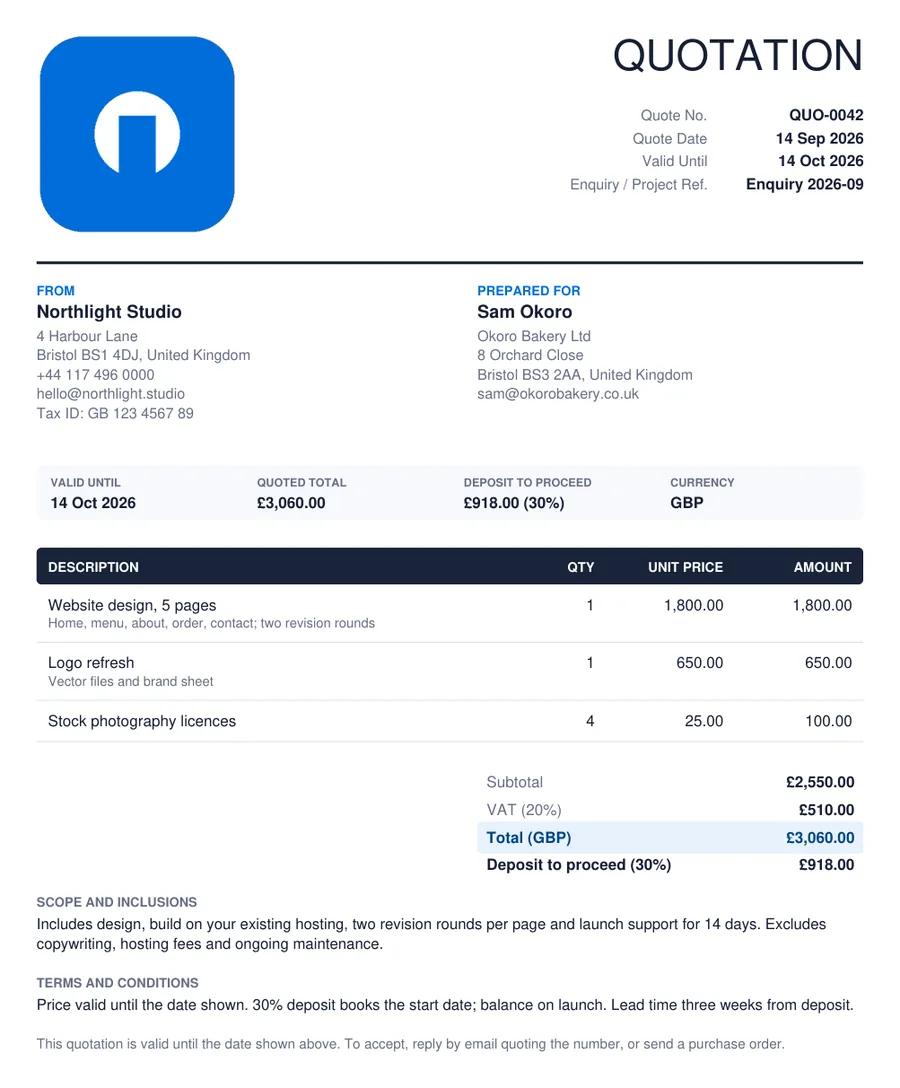
Example of a quotation created with the free quotation maker: from and prepared for, valid-until date and deposit strip, itemised lines with unit prices, totals with deposit to proceed, scope and terms
Quotation example. A price quotation produced by the quotation generator above and downloaded as a PDF: the two parties, the validity strip with the quoted total and deposit, three itemised lines, the totals, and the scope and terms. This is the quotation format most services, trades and suppliers use.

Step by step

How to create a quotation online

Here is how to make a quote with the online quotation creator above. It takes a few minutes for a typical job.

  1. 1

    Add your logo and details

    Upload your logo and fill in your business name, address, contact details and tax number under From. The tool remembers them in this browser for the next quote.

  2. 2

    Number, date and validity

    Give the quote a unique number, set the date, and choose how many days it is valid for — the valid-until date fills in for you. Quote the enquiry or project reference.

  3. 3

    Name the customer

    The decision-maker under Prepared For, with their company and the site or delivery address.

  4. 4

    Break the price into lines

    One line per item or stage with quantity and unit price. Use the detail line to say what each one includes.

  5. 5

    Set tax, discount and deposit

    Switch tax on and name it; add a discount if you are offering one; tick deposit to proceed and set the percentage. The totals update as you type.

  6. 6

    Write the scope and terms

    What is included, what is excluded, lead time, payment terms and how to accept. Two short paragraphs prevent most disputes.

  7. 7

    Download or print

    Download the quotation PDF and email it the same day, or print it to hand over. When it is accepted, create the invoice with the same lines.

  8. Prefer Word?

    Six editable quotation templates in .docx — standard, job estimate, price quotation, construction, project and options — are just below.

    Download the templates

Free · Editable · No signup

Free quotation templates in Microsoft Word (DOCX)

Six customisable quotation and estimate templates as Word files: a standard quotation, a job estimate, a product price quotation, a construction quotation, a project quotation with phases and a quotation with three options. Download, add your logo and details, fill in the price, and print or save as PDF.

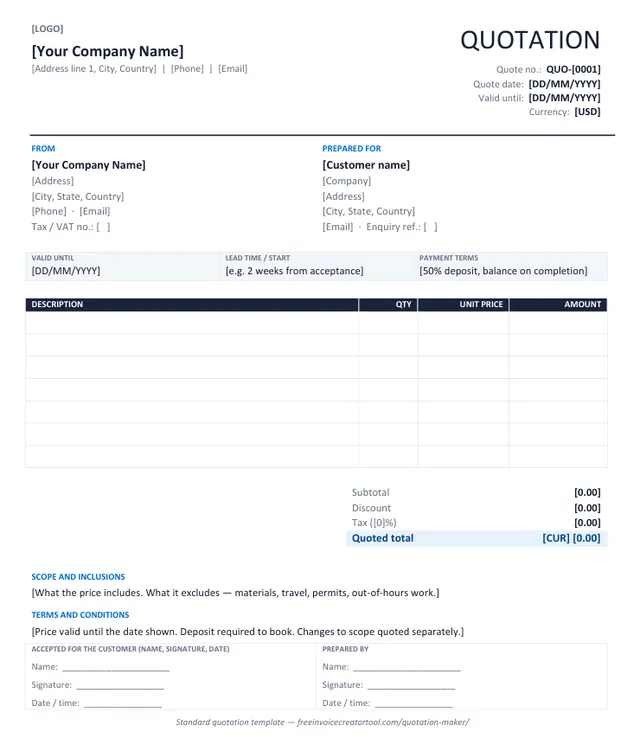
Preview of the standard quotation template in Microsoft Word

Template 1 · Word .docx

Standard quotation

Products or services, one tax rate, a validity date, scope and terms, and an acceptance line. The layout most businesses need.

  • From and Prepared For blocks with tax and enquiry numbers
  • Valid-until, lead time and payment terms strip
  • Description, quantity, unit price and amount columns
  • Subtotal, discount, tax and quoted total
  • Scope, terms and customer acceptance
Download .docx
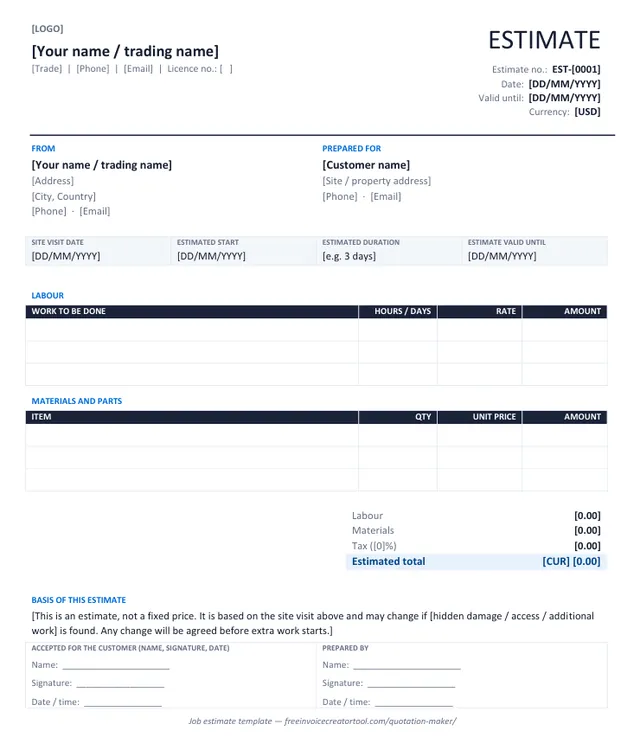
Preview of the job estimate (trades) template in Microsoft Word

Template 2 · Word .docx

Job estimate (trades)

For plumbers, electricians, builders and repairers: labour and materials in separate tables, with a basis-of-estimate note.

  • Site visit date, estimated start and duration
  • Labour table with hours or days and rate
  • Materials and parts table
  • Labour, materials, tax and estimated total
  • Basis-of-estimate statement
Download .docx
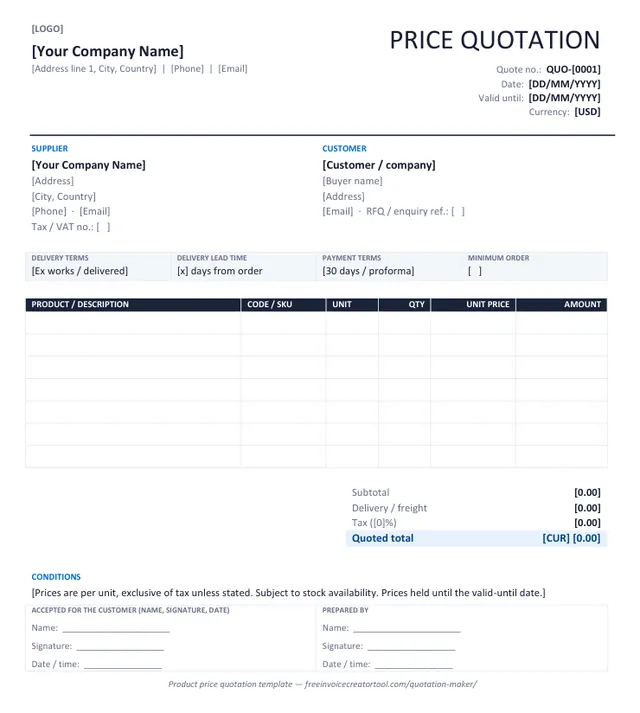
Preview of the product price quotation template in Microsoft Word

Template 3 · Word .docx

Product price quotation

For wholesalers and suppliers answering an RFQ: product codes, units, delivery terms, lead time and minimum order.

  • Supplier and customer with RFQ reference
  • Delivery terms, lead time, payment terms, minimum order
  • Product, code, unit, quantity, unit price and amount
  • Subtotal, freight, tax and quoted total
  • Conditions line
Download .docx
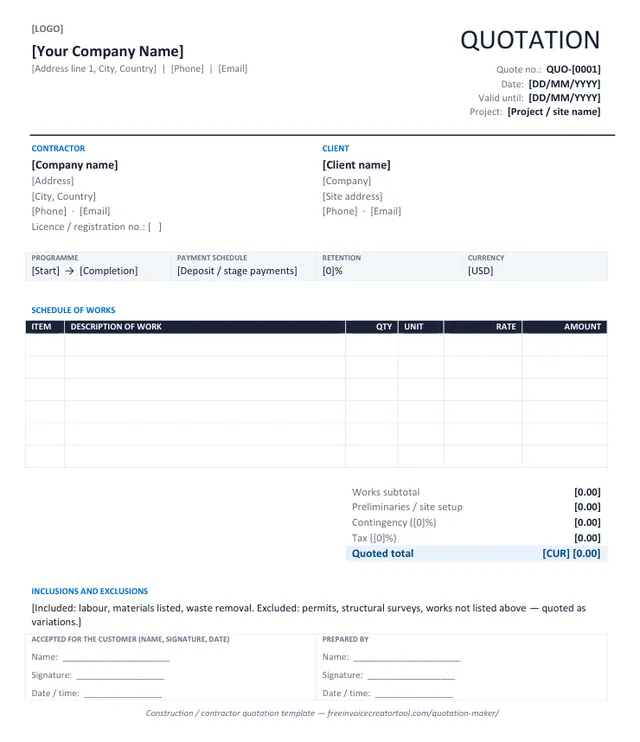
Preview of the construction / contractor quotation template in Microsoft Word

Template 4 · Word .docx

Construction / contractor quotation

A schedule of works with item numbers, quantities and rates, plus preliminaries, contingency and retention.

  • Contractor licence and client site address
  • Programme, payment schedule and retention strip
  • Numbered schedule of works with unit and rate
  • Preliminaries, contingency, tax and total
  • Inclusions and exclusions
Download .docx
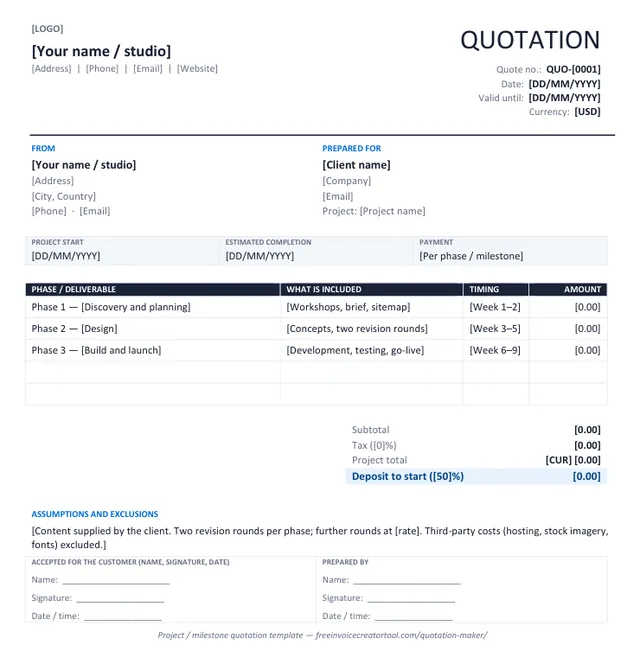
Preview of the project quotation (phases) template in Microsoft Word

Template 5 · Word .docx

Project quotation (phases)

For designers, developers and consultants: phases or milestones with what each includes, timing and a deposit to start.

  • Project start and estimated completion
  • Phase, deliverables, timing and amount table
  • Project total and deposit to start
  • Assumptions and exclusions
  • Acceptance line
Download .docx
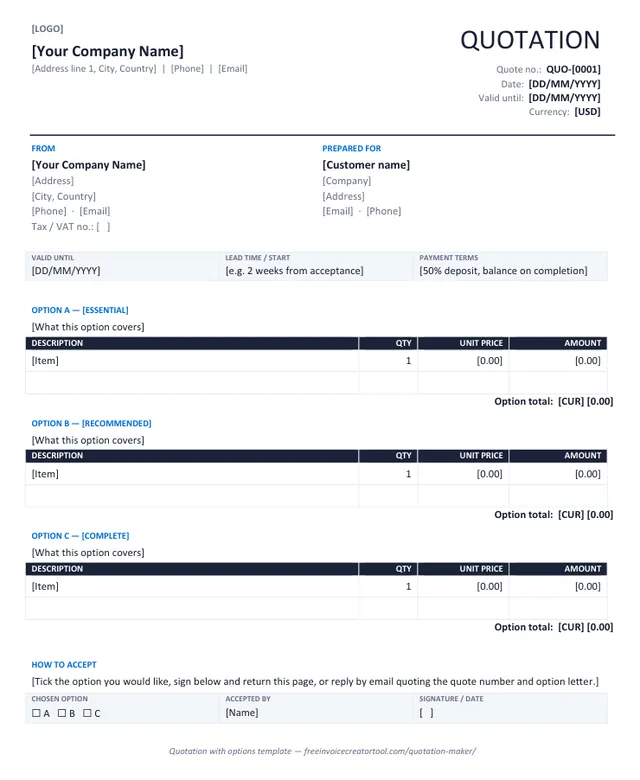
Preview of the quotation with options template in Microsoft Word

Template 6 · Word .docx

Quotation with options

Three priced options — essential, recommended, complete — each with its own lines and total, and a tick box to accept one.

  • Option A, B and C sections with their own tables
  • Option totals
  • Validity, lead time and payment strip
  • How-to-accept note
  • Chosen option, accepted by and signature strip
Download .docx

Customising in Word

Make a template yours in four steps

  1. Overwrite the bracketed text — business name, address, quote number, dates, currency — and delete the brackets.
  2. Insert your logo over the [LOGO] marker (Insert → Pictures, in line with text, about 3 cm high).
  3. Save it as your master copy (File → Save As → Word Template) so each new quotation starts with your details and terms.
  4. Fill in the lines, type the totals, and Save As PDF before sending — a quotation should never go out as an editable file.

Full walkthrough, and the template-vs-generator comparison, on the quotation templates page.

Types

Types of quotation and estimate

The same document, adapted to how you sell. The quotation maker above covers every type below; change the title and the lines.

Sales / price quotation

A fixed price for specified goods or services, valid for a period. The default here, and what most customers mean by “send me a quote”.

Estimate

A likely cost when the scope depends on what you find — repairs, renovations, restoration. Title it Estimate and say what would change the price.

Job quote (trades)

Labour and materials for a plumber, electrician, builder or mechanic, with a start date and duration. Often given the same day as the site visit.

Service quotation

Consulting, design, cleaning, events: the service described by outcome and by hours or units, with what is excluded.

Project quotation

Phases or milestones, each with deliverables, timing and an amount, and a deposit to start. For developers, agencies and consultants.

Construction quotation

A schedule of works with quantities and rates, preliminaries, contingency and retention. See the construction invoicing guide for what follows.

Quotation with options

Good, better, best. Three priced options let the customer choose a level instead of saying no to a single figure.

Proforma invoice

The invoice as it will look, issued before the sale to request advance payment or support an import. See the proforma invoice generator.

Know the difference

Quotation vs estimate vs proforma invoice vs invoice

Four documents that get confused with each other. The important line is the first one: only an invoice asks for payment of a debt.

Comparison of quotation, estimate, proforma invoice and invoice
FeatureQuotationEstimateProforma invoiceInvoice
Asks for paymentNoNoAdvance payment, no debtYes
Price isFixed until expiryApproximateFixed, as the invoice will beFinal
Issued whenBefore the work, as an offerBefore the work, when scope is uncertainBefore delivery, to secure payment or customsAfter delivery or completion
CarriesValid-until dateValid-until date and basisValidity and payment requiredDue date
NumberingQUO- seriesEST- seriesPI- seriesINV- series
Created hereYesYes — change the titleYes — proforma generatorYes — invoice creator

Full comparisons: quotation vs estimate · invoice vs quotation · what a proforma invoice is

Practical

Writing a quotation that gets accepted

Quotations sent the same day as the site visit are answered far more often than ones sent a week later. The tool is built for that: your details are already in, the totals do themselves, and the PDF is ready in a click.

How to write a quotation · Create the invoice when it is accepted

  • Break the price into lines. Itemised lines let the customer see what they are buying and adjust scope rather than walk away.
  • Name the exclusions. Materials, permits, disposal, out-of-hours work, travel. Naming them now prevents an argument later.
  • Give the price an expiry. It protects your margin when supplier prices move, and it gently encourages a decision.
  • Ask for the deposit on the quote. A deposit stated up front is accepted; one raised after acceptance is resented.
  • Say what happens next. “Reply to accept and I will book the week of the 14th” beats leaving the customer to work out how to proceed.
  • Carry the lines to the invoice. Same wording, same order, quotation number referenced — so the person approving payment can match the two without asking.

A quote and invoice generator in one app

Invoice & Quotation Generator creates quotations and invoices in the same place on Android, so the details you captured at the survey are still there when it is time to bill, and every document is saved and exported as a PDF.

  • Quotations, estimates, invoices, receipts and waybills
  • Customer details saved for reuse
  • Line items, taxes, discounts and automatic totals
  • Export as PDF, then print or share
  • Free, with unlimited documents
Get the Android app
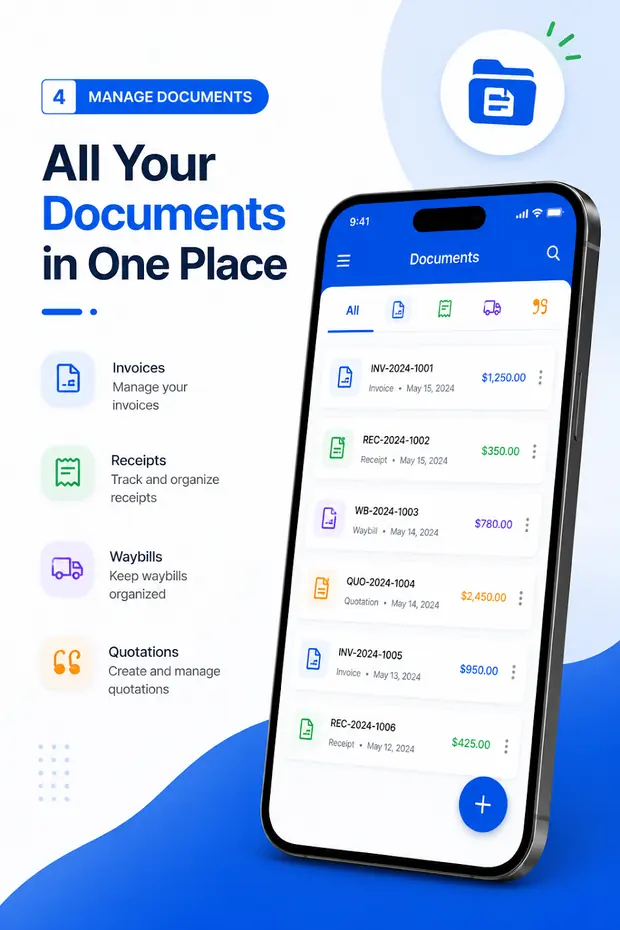
Quotations listed alongside invoices, receipts and waybills in the Android app

Questions

Quotation maker FAQ

What is a quotation?

A quotation is a formal offer to supply goods or services at a stated price, under stated conditions, for a stated period. Once the customer accepts it, both sides have agreed what will be done and what it will cost. It is also called a quote, a price quotation or a sales quotation.

Can I create a quotation online for free?

Yes. This quotation generator is free and runs in your browser: fill in your business, the customer, the items and the price, then download an A4 PDF or print it. There is no account, no login, no watermark, no limit, and nothing you type is uploaded.

Is this an estimate maker too?

Yes. Change the title to Estimate and the tool becomes a free estimate maker: the layout, the validity date, the totals and the PDF are the same. Say on the document that it is an estimate and what would change the price. See quotation vs estimate.

How is a quotation different from an estimate?

A quotation is a fixed price you are offering to stand behind until the valid-until date. An estimate is your best assessment of a likely cost, which may change as the work is understood. Say which one you are giving — the difference is what a customer will hold you to.

How long should a quotation be valid?

Long enough for the customer to decide, short enough to protect you from price movements. Seven to thirty days is common. The tool sets the valid-until date for you from the number of days you choose. See how long a quote is valid.

Should a quotation include tax?

Show the net price, the tax and the gross total separately, exactly as you would on an invoice. A customer comparing quotes needs to know whether the headline figure includes tax. Switch tax on in the settings and name it VAT, GST or sales tax.

Can I ask for a deposit on the quotation?

Yes. Tick Ask for a deposit to proceed, set the percentage, and the quotation shows the deposit amount under the total and in the summary strip, so the customer knows what is payable to book.

Can a quotation become an invoice?

Yes. Once the customer accepts, create the invoice with the same line items and quote the quotation number on it. Together the two tools work as an invoice quote generator: the same business details, the same currencies and tax settings, so the estimate and invoice match line for line.

What is a proforma invoice, and can I make one here?

A proforma invoice is laid out like an invoice but issued before the sale completes — commonly to request advance payment or to support an import. Use the proforma invoice generator, which is this tool with proforma defaults, or read the proforma invoice guide.

Is there a quotation maker for PC?

This page is one: the quote generator runs in the browser on Windows, Mac, Linux and Chromebook with nothing to install, and works the same on a tablet or phone. Your business details are kept in the browser you use, so a quotation maker on your PC at the office and on your phone on site each start with them filled in.

Is there a quotation maker app?

The web tool works on any phone, tablet or PC. For a quotation maker app that saves customers and turns an accepted quote into an invoice, Invoice & Quotation Generator does that on Android. Get it on Google Play.

Related pages