Free · No signup · PDF download

Free Waybill Maker – Create a Waybill Online

Use this free waybill generator to create a consignment note in minutes: sender, receiver, carrier, the goods with packages and weight, and delivery instructions. Download the waybill as a PDF or print it for the driver. No account, no login, no watermark.

  • Sender, receiver and carrier details
  • Packages and weight totals
  • Carrier, driver and vehicle
  • Instant A4 PDF, no account

Online Waybill Generator

Fill in the waybill below — sender, receiver, transport details and the goods — then download the PDF or print it for the driver to carry. Nothing you type is sent to us.

Upload logo

PNG, JPG or WebP.
Up to 2 MB.

Sender / Consignor

Receiver / Consignee

Goods on this waybill
Description of goods Qty Packages Weight (kg) Remove

Total quantity0

Total packages0

Total weight0.00 kg

Everything above stays in this browser tab. Do you want to save documents for later use? Download the mobile app

Download or print

Settings

Invoice & Quotation Generator Android app icon Sending goods regularly?

Waybills, invoices, receipts and quotations on your phone.

Get the Android app
Consignment0 pkg · 0.00 kg
  • No signup or login
  • Instant PDF download
  • Processed in your browser
  • Free, with no invoice limit

Waybill meaning

What is a waybill?

Waybill meaning: a waybill is a document that accompanies a shipment of goods and lists who sent it, who is to receive it, what it contains and how it is travelling. The receiver checks the consignment against the waybill and signs it, which makes the signed copy the sender’s proof of delivery.

The word covers a family of documents: a courier’s waybill, a haulier’s consignment note, a rail or road waybill, and the delivery note a supplier sends with an order. What they share is that they record the movement of goods, not the money — that is the invoice’s job.

Who issues it

The sender (consignor), or the carrier on the sender’s behalf. It is prepared before the goods leave.

Who signs it

The receiver (consignee) on delivery — and often the driver on collection — recording the date and any shortage or damage.

What it proves

That a specific consignment left the sender, travelled with a named carrier and arrived, as described, at the receiver.

What it is not

Not an invoice, not a receipt for payment, and not a bill of lading — a waybill is not a document of title to the goods.

Anatomy

What a waybill must include

Every field below is on the waybill maker above. The right-hand column is why the field is there.

Waybill fields and their purpose
FieldWhy it is there
Waybill numberThe reference everyone quotes: you, the driver, the receiver and, in a dispute, both sets of accounts.
Dispatch and delivery datesWhen the goods left and when they are expected; together they show how long the consignment was in transit.
Sender (consignor)Your business name, dispatch address and a contact number for queries in transit.
Receiver (consignee)Who takes delivery and a phone number — the single most useful field for a driver.
Delivery addressThe physical address the goods go to, which is often not the billing address on the invoice.
Carrier, driver and vehicleWho is moving the goods. On a signed copy this is the chain of custody.
Description of goodsSpecific enough to check against: what each item is, plus batch, serial or SKU references.
Quantity, packages and weightHow many units, how many cartons or pallets, and the weight the carrier needs for loading and pricing.
Related invoice or orderThe link between the movement record and the financial record.
Delivery instructionsAccess, opening hours, where to leave the consignment.
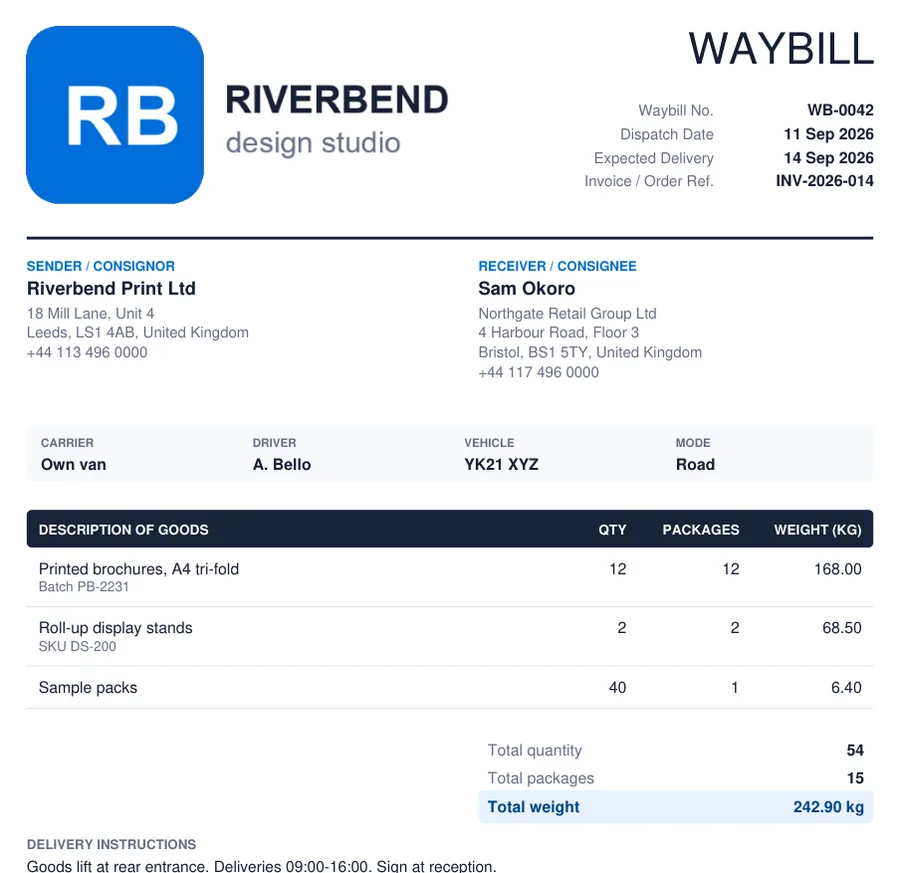
Example of a waybill created with the free waybill maker: sender and receiver, carrier, driver and vehicle, goods with quantity, packages and weight, and totals
Waybill example. A consignment note produced by the waybill generator above and downloaded as a PDF: sender and receiver, the transport strip, three lines of goods with packages and weight, and the totals. This is the waybill format most road, courier and domestic deliveries use.

Step by step

How to create a waybill online

Here is how to generate a waybill with the tool above. It takes a couple of minutes for a typical consignment.

  1. 1

    Number and date it

    Give the waybill a unique number, set the dispatch date and the expected delivery date, and quote the invoice or order it relates to.

  2. 2

    Add sender and receiver

    Your dispatch address under Sender; the receiver’s name, delivery address and — above all — a phone number the driver can call.

  3. 3

    Record the transport

    Carrier, driver, vehicle number and the mode — road, courier, rail, air or sea. This is the chain of custody on the signed copy.

  4. 4

    List the goods

    One line per item with quantity, number of packages and weight. Add batch or serial references in the detail line so the receiver can check them off.

  5. 5

    Add instructions

    Access details, opening hours, where to leave the consignment, and a note asking the receiver to record any shortage or damage before signing.

  6. 6

    Decide on value

    Leave prices off for a normal delivery. Switch on the declared value column only when customs or insurance needs it.

  7. 7

    Download or print

    Download the waybill PDF, or print a copy to travel with the goods and one to keep.

  8. Prefer Word?

    Six editable waybill templates in .docx — standard, courier, freight, delivery note, manifest and international — are just below.

    Download the templates

Free · Editable · No signup

Free waybill templates in Microsoft Word (DOCX)

Six customisable waybill templates as Word files: a standard waybill, a courier waybill, a freight consignment note, a delivery note, a multi-drop delivery manifest and an international waybill. Download, add your logo and details, fill in the consignment, and print or save as PDF.

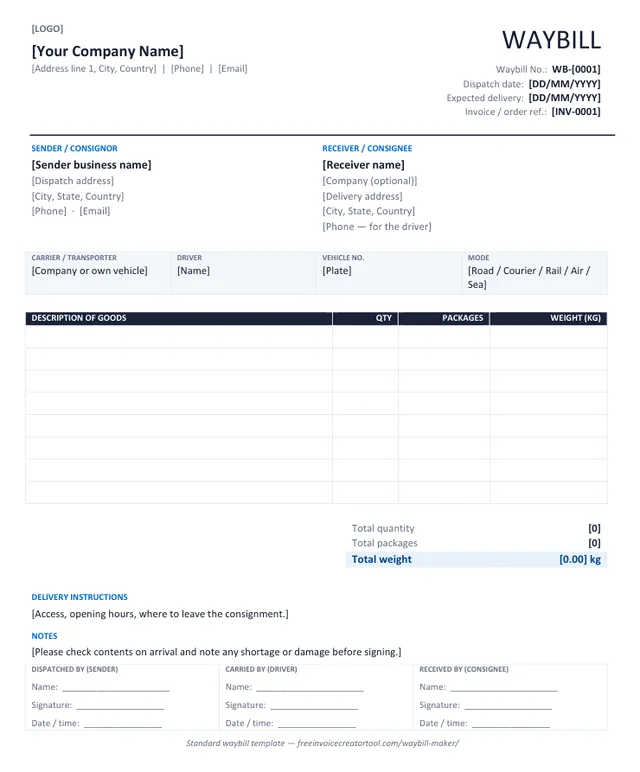
Preview of the standard waybill template in Microsoft Word

Template 1 · Word .docx

Standard waybill

Road, courier and domestic deliveries — the layout most small businesses need.

  • Sender and receiver blocks
  • Carrier, driver, vehicle and mode strip
  • Goods with quantity, packages and weight
  • Totals, delivery instructions and notes
  • Three signature boxes
Download .docx
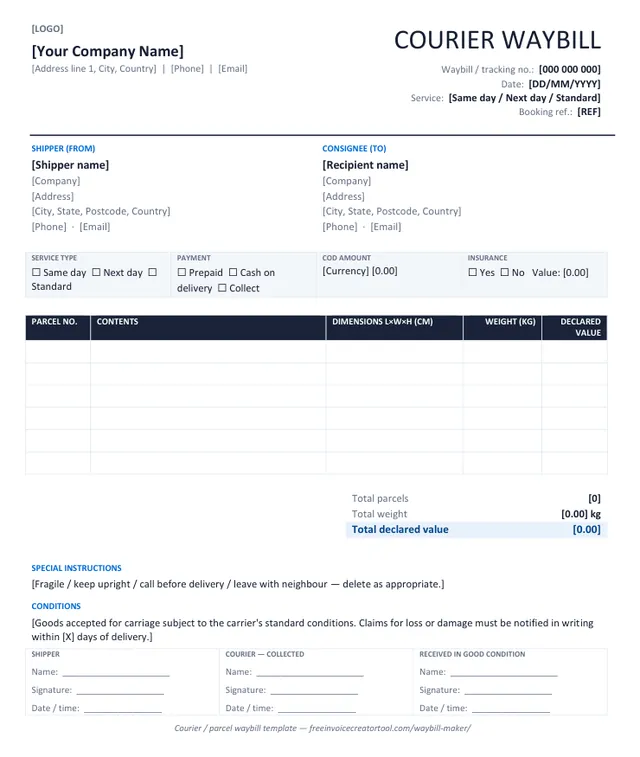
Preview of the courier / parcel waybill template in Microsoft Word

Template 2 · Word .docx

Courier / parcel waybill

Parcel and express shipments with service level, payment and cash-on-delivery.

  • Waybill / tracking number and booking reference
  • Service type and payment tick boxes
  • COD amount and insurance
  • Parcel table with dimensions and declared value
  • Received-in-good-condition signature
Download .docx
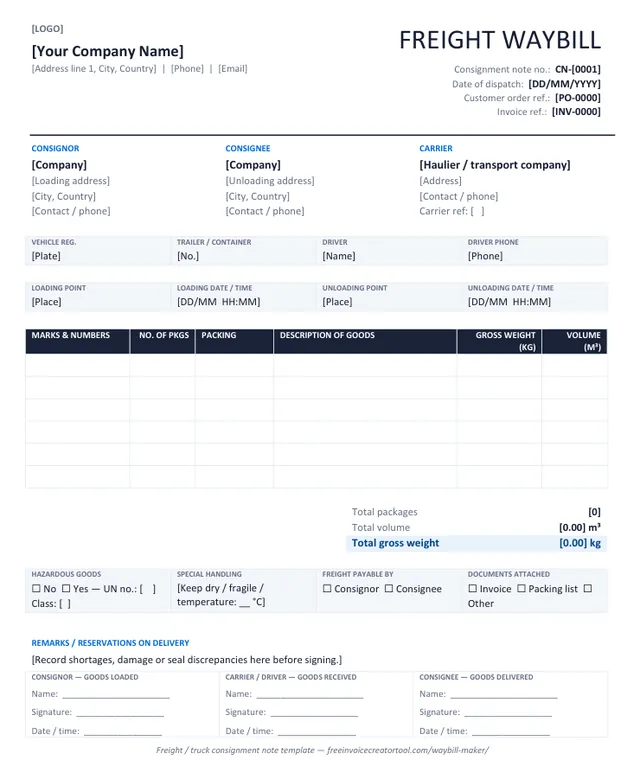
Preview of the freight / truck consignment note template in Microsoft Word

Template 3 · Word .docx

Freight / truck consignment note

Pallets and truckloads: loading and unloading points, hazardous goods, volume and gross weight.

  • Consignor, consignee and carrier side by side
  • Vehicle, trailer, driver and loading / unloading times
  • Marks and numbers, packing, gross weight and volume
  • Hazardous goods, special handling, freight payable by
  • Reservations on delivery
Download .docx
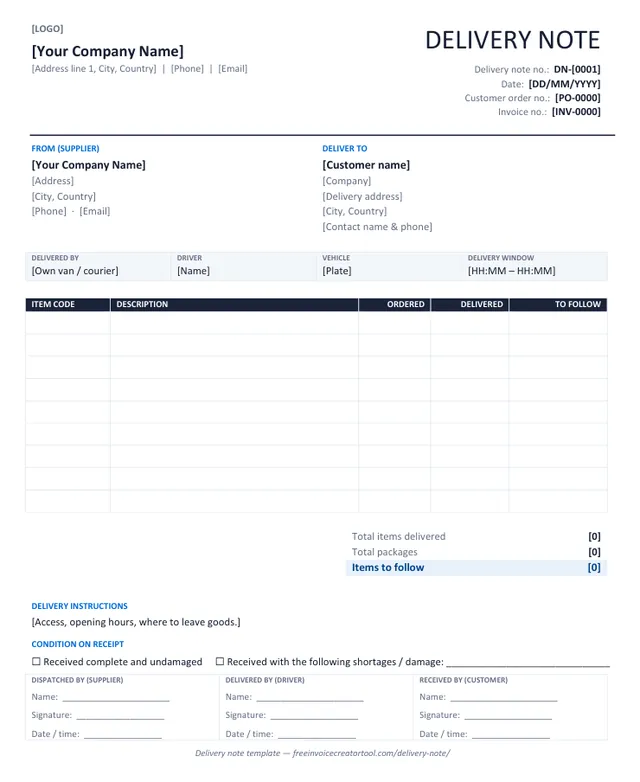
Preview of the delivery note template in Microsoft Word

Template 4 · Word .docx

Delivery note

Sent with an order so the customer can check goods against what they bought.

  • Delivery note number, order and invoice references
  • Supplier and deliver-to blocks
  • Item code, ordered, delivered and to-follow columns
  • Condition-on-receipt tick boxes
  • Supplier, driver and customer signatures
Download .docx
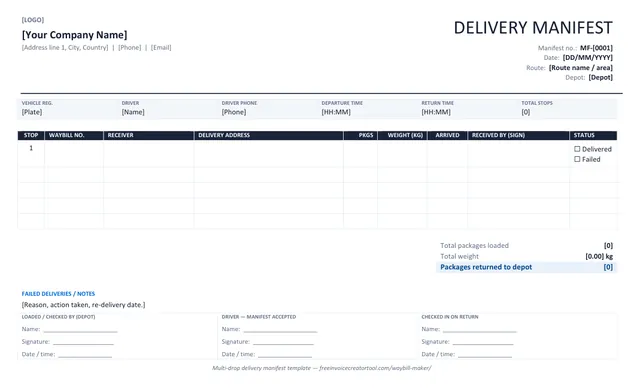
Preview of the multi-drop delivery manifest template in Microsoft Word

Template 5 · Word .docx

Multi-drop delivery manifest

One sheet for a whole route: every stop, waybill number, packages and a signature per drop. Landscape.

  • Vehicle, driver, route and departure / return times
  • One row per stop with waybill number and receiver
  • Packages, weight, arrival time and status per drop
  • Failed deliveries and returns to depot
  • Depot load-check and driver acceptance
Download .docx
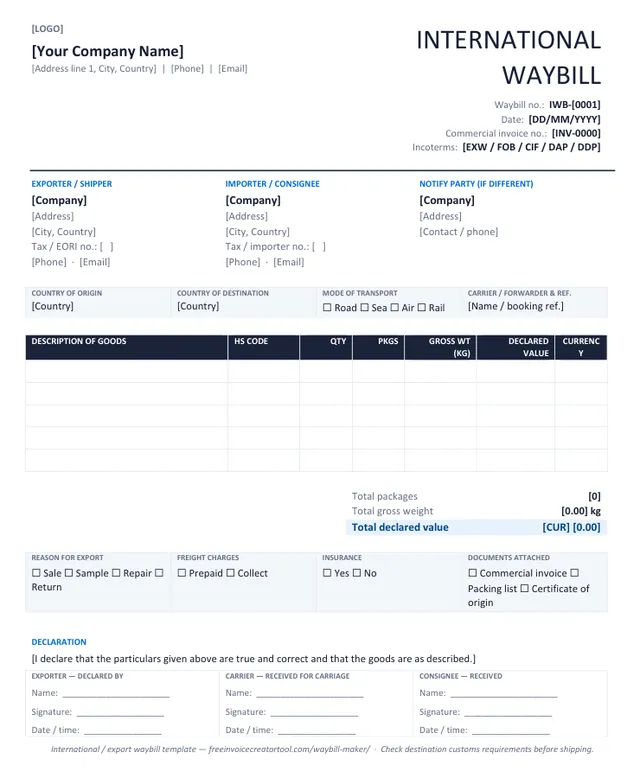
Preview of the international / export waybill template in Microsoft Word

Template 6 · Word .docx

International / export waybill

Cross-border consignments: HS codes, country of origin, Incoterms and declared value.

  • Exporter, importer and notify party
  • Origin, destination, mode and carrier reference
  • HS code, gross weight and declared value per line
  • Reason for export, freight and insurance tick boxes
  • Exporter declaration and signatures
Download .docx

Customising in Word

Make a template yours in four steps

  1. Overwrite the bracketed text — company, address, number, dates — and delete the brackets.
  2. Insert your logo over the [LOGO] marker (Insert → Pictures, in line with text, about 3 cm high).
  3. Save it as your master copy (File → Save As → Word Template) so each new waybill starts with your details.
  4. Fill in the consignment and print two copies — one travels with the goods, one comes back signed — or Save As PDF to email it.

Full walkthrough, and the template-vs-generator comparison, on the waybill templates page.

Types

Types of waybill

The same document, adapted to how the goods travel. The tool above covers every type below; choose the mode in the transport strip.

Courier waybill

Parcels and express shipments. Usually printed as a label with a barcode; the courier’s own waybill number is what you track.

Freight / road waybill

Pallets and truckloads by road. Records vehicle, driver, weight and package count; signed at both ends. Also called a consignment note or CMR in Europe.

Rail waybill

Issued by the railway for wagon or container loads, naming the loading and unloading stations.

Sea waybill

A non-negotiable alternative to a bill of lading for ocean freight; the goods are released to the named consignee without presenting the document.

Air waybill (AWB)

Issued by an airline or forwarder for air cargo, with an 11-digit AWB number. A contract of carriage, not a document of title.

Domestic / express waybill

Everyday deliveries within a country: supplier to customer, warehouse to shop, depot to site. This is what most small businesses need.

Delivery note

The supplier’s version of the waybill, sent with an order so the customer can check it against what they bought. See the delivery note generator.

Waybill label

A condensed waybill stuck to the outside of the package: sender, receiver, number and barcode. It points back to the full document.

Worked examples

Waybill examples: road, sea and air

What each kind of waybill actually says, and which of them you can generate here.

Road / domestic way bill example

The everyday case, and the one the generator above produces. A furniture supplier sending two wardrobes and a headboard from a Lagos warehouse to a customer in Ibadan:

WAYBILL — WB-0416 · Dispatch 14 October 2026 · Expected delivery 15 October 2026

Consignor: Meridian Furniture Ltd, 14 Trade Road, Ikeja, Lagos · 0803 555 0142
Consignee: Mrs F. Adeyemi, 22 Oluyole Estate, Ibadan · 0806 555 0198
Carrier: own vehicle · Driver: S. Okon · Vehicle: LAG-441-XA

1. Wardrobe, 2-door, oak finish — 2 packages — 96 kg
2. Headboard, king, upholstered — 1 package — 18 kg
Total: 3 packages · 114 kg · declared value not shown

Delivery instructions: call 30 minutes before arrival; no lift, second floor.
Received by: ______________   Signature: ______________   Date: __________

Two details do the work. Packages and weight are totalled, so the driver and the receiver can agree what arrived without unpacking anything. And the received-by block is printed rather than added by hand, which is what makes the document evidence rather than a note.

Air waybill (AWB) example

An air waybill — airway bill or AWB in everyday use — is issued by the airline or freight forwarder, not by you. It carries an 11-digit number whose first three digits identify the carrier — 125 for British Airways, 176 for Emirates, 057 for Air France — followed by a seven-digit serial and a check digit, for example 125-38472916.

A typical AWB records the shipper and consignee, the airports of departure and destination, the number of pieces, gross weight and chargeable weight, the nature of the goods, the declared value for carriage and for customs, and the conditions of contract on the reverse. It is a contract of carriage and a receipt for the goods, but unlike a bill of lading it is not a document of title, so the goods are released to the named consignee without it being presented.

You cannot generate a valid air waybill here, or anywhere other than the carrier. The number has to come from the airline's own stock. If you are looking to download an air waybill or an airway bill, it is on your carrier's tracking page under the booking reference — an online airway bill is retrieved from the carrier, never generated by a third party. What you can produce here is the waybill or delivery note that travels with the goods to or from the airport.

Sea waybill example

A sea waybill does the same job for ocean freight: shipper, consignee, notify party, vessel and voyage number, port of loading and discharge, container and seal numbers, package count and gross weight, and a description of the goods. Like the AWB it is non-negotiable, which is exactly why shippers choose it over a bill of lading when the cargo will arrive before the paperwork could.

Also issued by the carrier. See waybill vs bill of lading for when each is appropriate.
Online

Generating a waybill online

What a waybill website can and cannot do for you. (Written as one word or two — waybill and way bill are the same document, and both spellings are in common use.)

Online waybill generation splits into two completely different things, and searches for it land on both:

  • Generating your own waybill — the document that travels with goods you are sending, signed on receipt. That is what the generator above does: fill it in, download the PDF, print two copies, one for the driver and one for the customer. No account, no charge per document. To generate a way bill online here, start at the form above — there is nothing to create or log in to first.
  • Getting a carrier's waybill number — booking a shipment with DHL, FedEx, UPS, GIG or a local courier and printing their label. Only the carrier can issue that, through their own booking system, because the number has to exist in their network before the parcel can move.

If you are shipping through a courier, book with them and use their label. If you are moving goods yourself, or by a hired vehicle, or handing over to a customer who has to sign for them, the document you need is the one on this page.

Know the difference

Waybill vs delivery note vs bill of lading vs air waybill

Four documents that get confused with each other. The important line is the last one: only a bill of lading is a document of title.

Comparison of shipping documents
FeatureWaybillDelivery noteBill of ladingAir waybill
Issued bySender or carrierSupplierOcean carrierAirline or forwarder
TransportAny — road, courier, rail, seaAny, usually roadSeaAir
Shows pricesUsually notUsually notNoCharges, not goods value
Signed on deliveryYesYesSurrendered to release goodsDelivery receipt
Document of titleNoNoYesNo
Created hereYesYes — delivery noteNoNo

Full comparisons: waybill vs bill of lading · air waybill vs waybill · delivery note vs invoice

Looking for India’s GST E-Way Bill?

That is a different document. The E-Way Bill is generated on the government portal at ewaybillgst.gov.in for consignments above the GST value threshold, carries its own EBN number and validity period, and is checked by tax officers in transit. The tool on this page creates an ordinary commercial waybill for your own consignments — useful alongside an E-Way Bill, never a substitute for one.

Practical

Waybill numbers and the invoice

Put the invoice number on the waybill and the waybill number on the invoice. When a customer disputes a delivery three weeks later, that one habit turns an argument into a lookup.

How to number waybills · Create the matching invoice

  • Number every consignment, including free ones. Samples and replacements go missing as easily as anything else.
  • Record shortages and damage on the waybill at the door, before it is signed. A note signed at delivery is worth far more than an email the next day.
  • For a part delivery, state what is outstanding so the receiver knows more is coming.
  • Photograph the signed copy. Paper waybills are the documents most likely to go missing between the van and the office.
  • Cross-border shipments need more: a commercial invoice with values, origin and tariff codes alongside the transport document.

Waybills, invoices and receipts in one app

Invoice & Quotation Generator creates waybills on Android with the sender and receiver details saved for next time, so a consignment note can be generated at the point of dispatch and the PDF sent to the driver and the customer.

  • Waybills, invoices, receipts and quotations
  • Sender and receiver details saved for reuse
  • Item and quantity lines for each consignment
  • Export as PDF, then print or share
  • Free, with unlimited documents
Get the Android app
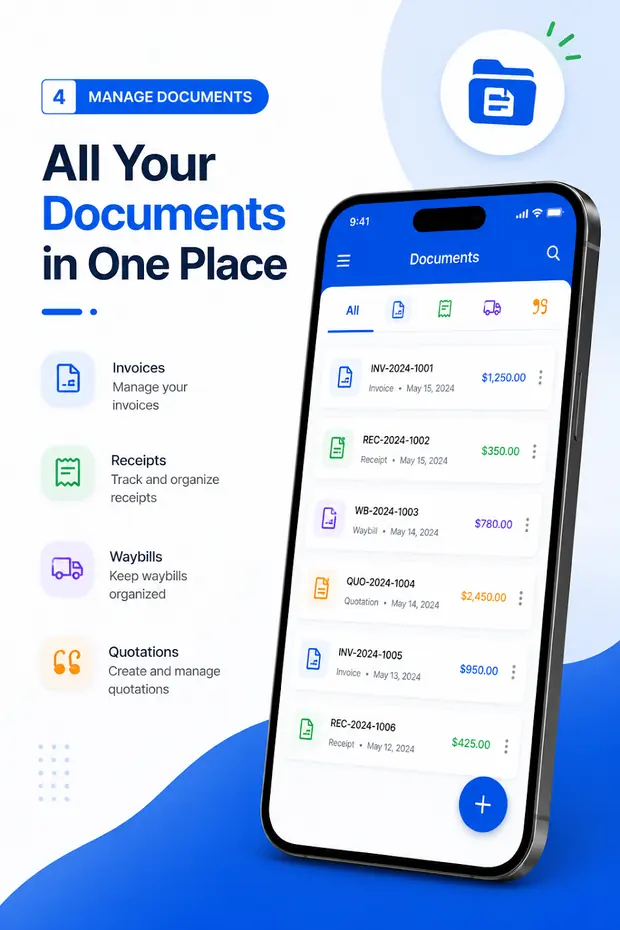
Waybills listed alongside invoices, receipts and quotations in the Android app

Questions

Waybill maker FAQ

What is a waybill?

A waybill is the document that travels with a consignment of goods. It records who sent them, who is receiving them, what is in the shipment and how many units, so the delivery can be checked and signed for on arrival. It is also called a consignment note or, in many countries, a delivery note.

Can I create a waybill online for free?

Yes. The waybill generator on this page runs in your browser: fill in the sender, receiver, carrier and goods, then download an A4 PDF or print it. There is no account, no login and no watermark.

Does a waybill show prices?

Usually not. A waybill proves what was delivered; the invoice deals with what it costs. Leaving prices off means the driver, the warehouse and the person signing at the door never see your commercial terms. Where a value is needed — for customs or insurance — switch on the declared value column.

What is the difference between a waybill and an invoice?

The waybill is a movement record and the invoice is a financial record. One delivery produces both: the waybill is signed on arrival, the invoice goes to accounts. Put the invoice number on the waybill so a disputed delivery can be matched to the bill for it.

Is this the GST E-Way Bill?

No. India’s E-Way Bill is a statutory GST document generated on the government portal (ewaybillgst.gov.in) for consignments above the value threshold, with its own number and validity. This tool creates an ordinary commercial waybill for your own consignments; it does not replace an E-Way Bill where one is legally required.

What is a waybill number?

A unique reference you assign to each consignment — WB-001, WB-002 and so on. It is what the driver, the receiver and both sets of accounts quote when they refer to the shipment. See waybill numbers explained.

Can I use this as a blank waybill template?

Yes. Leave the fields empty, print the sheet, and you have a blank waybill form to fill in by hand. Or keep it on screen: the generator remembers your sender details in this browser, so it works as a reusable waybill template — type the receiver and the goods, download the PDF. If you would rather work in Word, there are six free waybill templates in .docx.

How many copies of a waybill do I need?

Traditionally three: one kept by the sender, one that travels with the goods for the receiver, and one signed copy returned as proof of delivery. If you generate the waybill as a PDF, photograph the signed copy and keep it with your own record.

Can I create waybills on Android?

Yes. Invoice & Quotation Generator creates waybills on Android alongside invoices, receipts and quotations, keeps sender and receiver details for reuse and exports each document as a PDF. Get it on Google Play.

Related pages