Free · No signup · PDF download

Free Receipt Maker – Create a Receipt Online

Use this free receipt generator to create a payment receipt in minutes: who paid, what for, how much, and by which method. Add your logo, choose the currency, and download the receipt as a PDF or print it. No account, no login, no watermark.

  • Payment method, amount received and balance
  • Itemised lines with tax and discount
  • Every currency, your logo, a PAID stamp
  • Instant A4 PDF, no account

Online Receipt Generator

Fill in the receipt below — who paid, what for, how much and by which method — then download the PDF or print it. This online receipt maker calculates the totals, amount received and balance for you, and nothing you type is sent to us.

Upload logo

PNG, JPG or WebP.
Up to 2 MB.

Issued By

Received From

Items paid for on this receipt
Description Qty Rate Amount Remove
$0.00
$0.00
$0.00

Subtotal $0.00

Total $0.00

Balance due $0.00

Everything above stays in this browser tab. Do you want to save receipts for later use? Download the mobile app

Download or print

Receipt settings

Invoice & Quotation Generator Android app icon Issuing receipts every day?

Receipts, invoices, quotations and waybills on your phone, with your details saved.

Get the Android app
Received$0.00
  • No signup or login
  • Instant PDF download
  • Processed in your browser
  • Free, with no invoice limit

Receipt meaning

What is a receipt?

Receipt meaning: a receipt is a document a seller gives a buyer to confirm that payment has been received. It names the two parties, states the amount, the date and the method of payment, and says what the payment was for. For the customer it is proof of purchase; for the business it is the record that the transaction closed.

A receipt exists to answer one question later: did this get paid? That purpose decides what goes on it. Everything about the payment belongs; everything about a future obligation — due dates, payment terms — belongs on the invoice instead.

Who issues it

The party that received the money — the shop, the tradesperson, the landlord, the freelancer — at the moment payment is made or as soon after as practical.

Who keeps it

Both sides. The customer needs it for returns, warranty claims and expense reports; the business needs its copy for bookkeeping and tax.

What it proves

That a specific sum was paid, on a date, by a method, for a stated purpose — the four facts that settle almost every later dispute.

What it is not

Not an invoice (which asks for payment), not a quotation (which offers a price), and not a bank statement — a receipt comes from the seller, not the bank.

Anatomy

What a receipt must include

Every field below is on the receipt maker above. The right-hand column is why the field is there.

Receipt fields and their purpose
FieldWhy it is there
The word “Receipt”So it is never mistaken for an invoice and paid twice. The title is editable for a cash receipt, rent receipt or sales receipt.
Receipt numberUnique and sequential, in its own series. The reference both sides quote when they refer to the payment.
Date paidThe date the money was received, which may not be the date of the sale or the invoice.
Issued byYour business name, address and contact details, plus a tax number if you are registered.
Received fromWho paid. Needed if they are claiming the expense or returning the goods.
Invoice or order referenceTies the payment to the bill it settles, so the ledger closes on both sides.
Payment methodCash, card, bank transfer, mobile money, cheque. This is the field that makes a receipt useful in a dispute.
What was paid forItemised lines with quantity, rate and amount, or a single line referencing the invoice being settled.
TaxShown separately with its rate if you are registered, so the customer can reclaim it.
Amount received and balanceThe actual sum paid, and — for a deposit or part payment — what remains. A PAID stamp when the balance is zero.
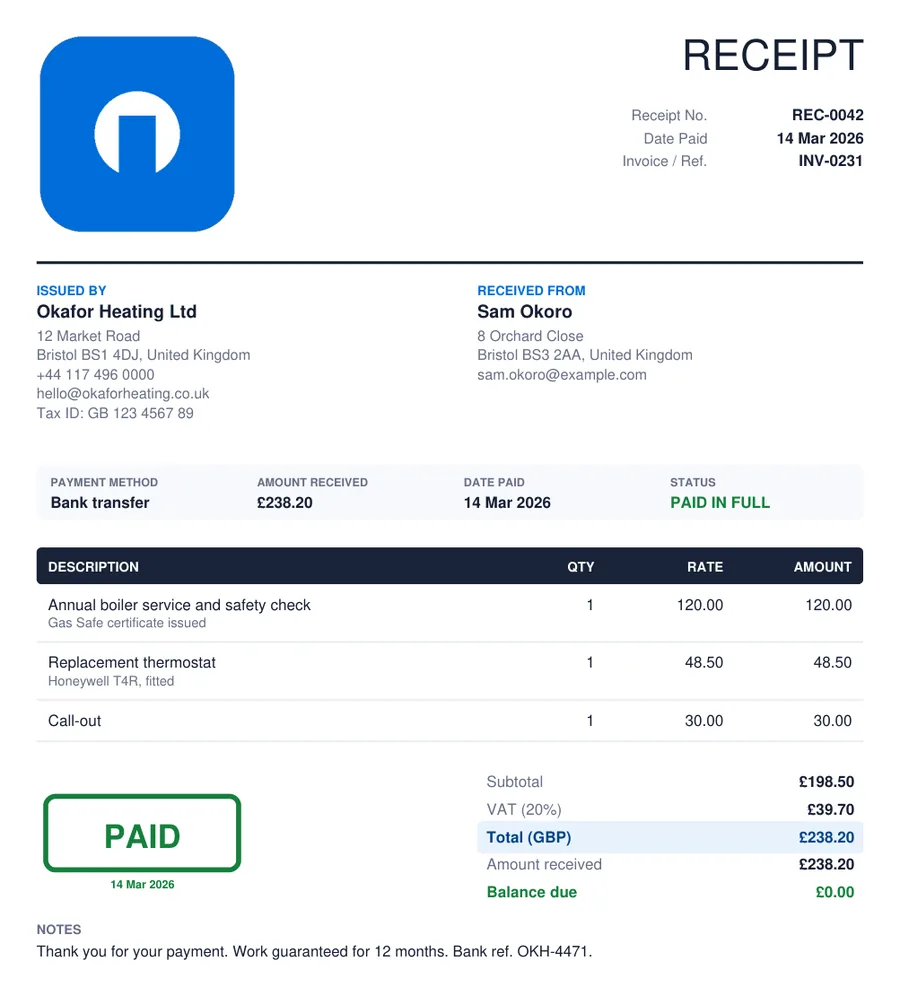
Example of a receipt created with the free receipt maker: issued by and received from, payment method and amount received, itemised lines, totals with balance due and a PAID stamp
Receipt example. A payment receipt produced by the receipt generator above and downloaded as a PDF: the two parties, the payment strip with method and amount received, three itemised lines, the totals with amount received and balance, and the PAID stamp. This is the receipt format most businesses, trades and landlords use.

Step by step

How to create a receipt online

Here is how to make a receipt with the online receipt creator above. It takes about a minute for a typical payment.

  1. 1

    Add your logo and details

    Upload your logo and fill in your business name, address, contact details and tax number under Issued By. The tool remembers them in this browser for the next receipt.

  2. 2

    Number and date it

    Give the receipt a unique number in its own series, set the date the money was received, and quote the invoice or order it settles.

  3. 3

    Name the payer

    The customer’s name under Received From, with a company, address or email if they will need the receipt for expenses or returns.

  4. 4

    Record the payment

    Choose the payment method — cash, card, bank transfer, mobile money, cheque — and type the amount received. Add a transaction reference in the notes if there is one.

  5. 5

    List what was paid for

    One line per item or service with quantity and rate. For a receipt against an invoice, a single line quoting the invoice number is enough.

  6. 6

    Set tax and discount

    If you are registered, switch tax on and name it VAT, GST or sales tax. Add a discount if one was given. The total, amount received and balance update as you type.

  7. 7

    Download or print

    Download the receipt PDF and email it, or print a copy for the customer and one to keep. The PAID stamp appears when the balance is zero.

  8. Prefer Word?

    Six editable receipt templates in .docx — payment, cash, sales, rent, deposit and service — are just below.

    Download the templates

Free · Editable · No signup

Free receipt templates in Microsoft Word (DOCX)

Six customisable receipt templates as Word files: a payment receipt, a cash receipt, a sales receipt, a rent receipt, a deposit receipt and a service receipt. Download, add your logo and details, fill in the payment, and print or save as PDF.

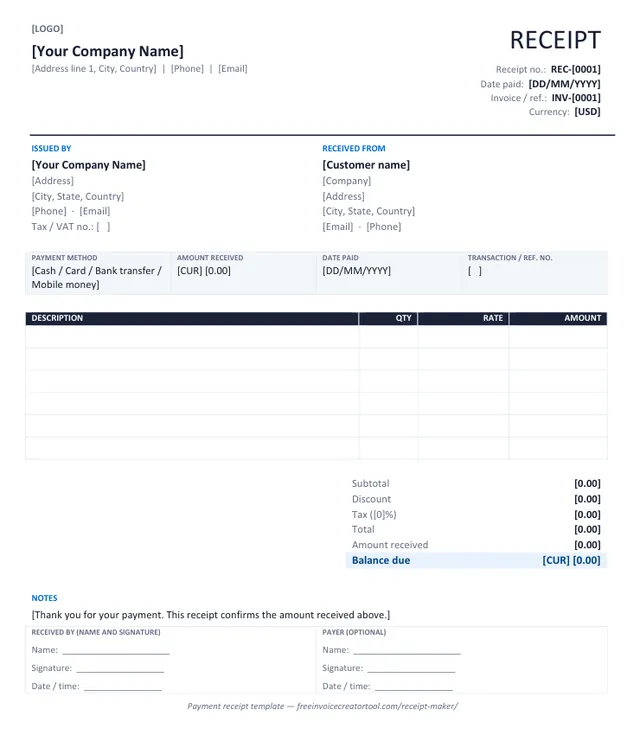
Preview of the payment receipt template in Microsoft Word

Template 1 · Word .docx

Payment receipt

The general-purpose receipt: who paid, what for, how, and the balance if any. Use it to confirm an invoice was settled.

  • Issued by and Received from blocks
  • Payment method, amount received and date paid strip
  • Itemised lines with quantity, rate and amount
  • Subtotal, discount, tax, total, received and balance due
  • Transaction reference and signature line
Download .docx
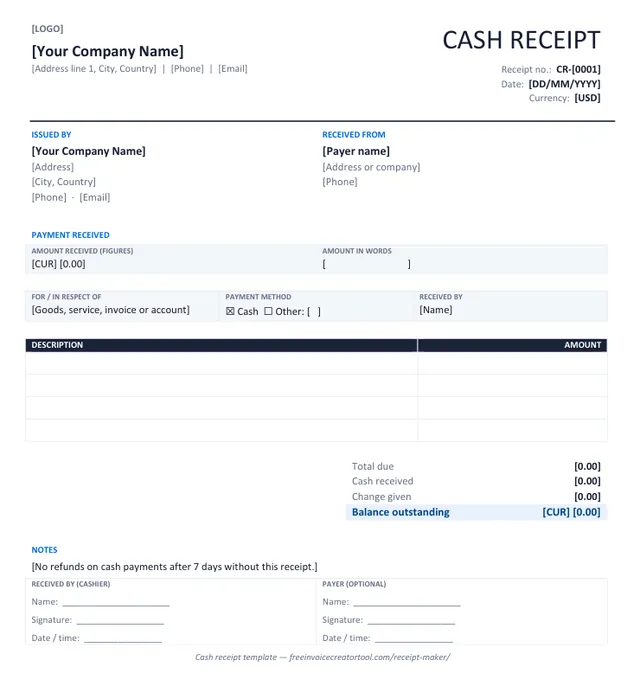
Preview of the cash receipt template in Microsoft Word

Template 2 · Word .docx

Cash receipt

Cash changes hands and nothing else records it — this receipt does. Amount in figures and in words, change given.

  • Amount received in figures and in words
  • What the payment was for
  • Cash received, change given and balance
  • Cashier name and signature
  • Short returns note
Download .docx
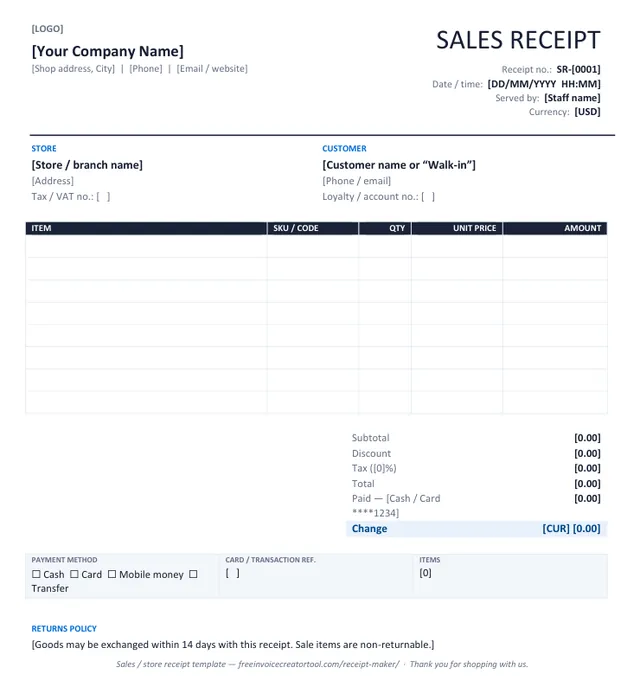
Preview of the sales / store receipt template in Microsoft Word

Template 3 · Word .docx

Sales / store receipt

Point-of-sale receipt for a shop, market stall or online order: items, SKUs, tax, payment and change.

  • Store and branch details with tax number
  • Item, SKU, quantity, unit price and amount
  • Discount, tax and total
  • Paid by cash or card with the last four digits
  • Returns policy line
Download .docx
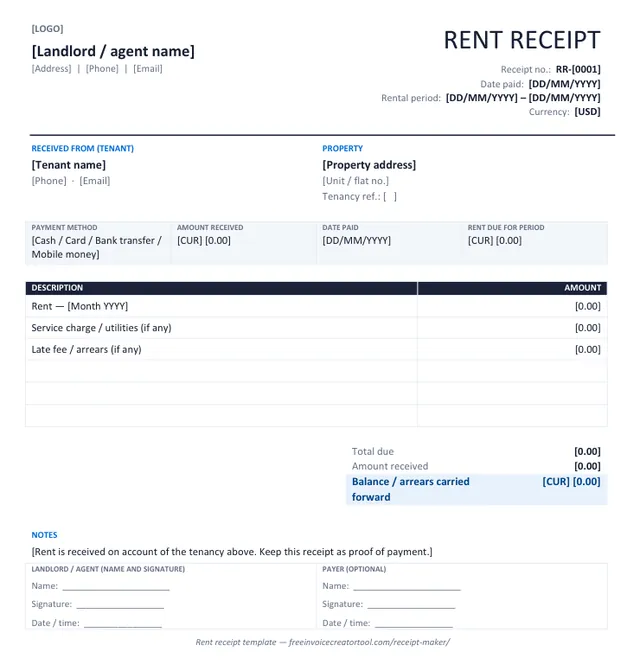
Preview of the rent receipt template in Microsoft Word

Template 4 · Word .docx

Rent receipt

For landlords and agents: rent received for a stated period and property, with arrears carried forward.

  • Tenant and property address
  • Rental period covered
  • Rent, service charge and late-fee lines
  • Amount received and arrears carried forward
  • Landlord or agent signature
Download .docx
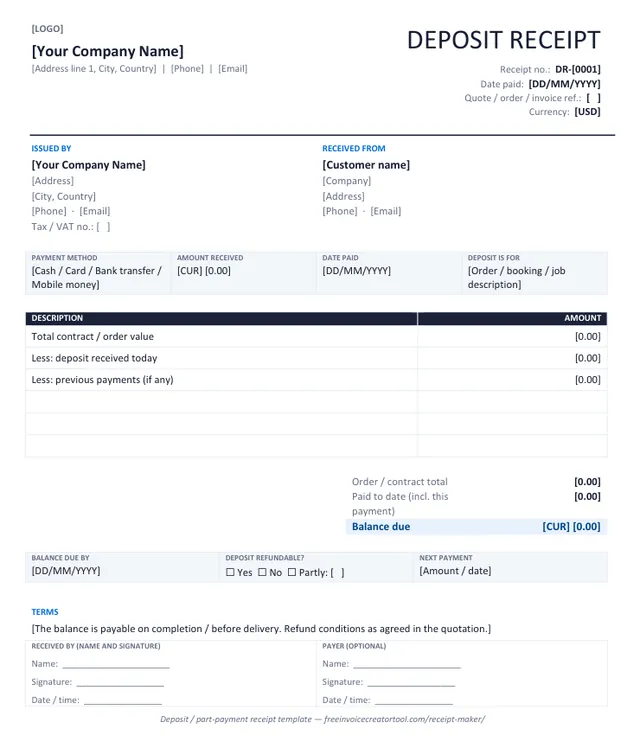
Preview of the deposit / part-payment receipt template in Microsoft Word

Template 5 · Word .docx

Deposit / part-payment receipt

A deposit or instalment against a larger order: total value, paid to date, balance and when it is due.

  • Quote, order or invoice reference
  • Order total, deposit received and previous payments
  • Balance due and the date it is due
  • Refundable-or-not tick box
  • Terms line
Download .docx
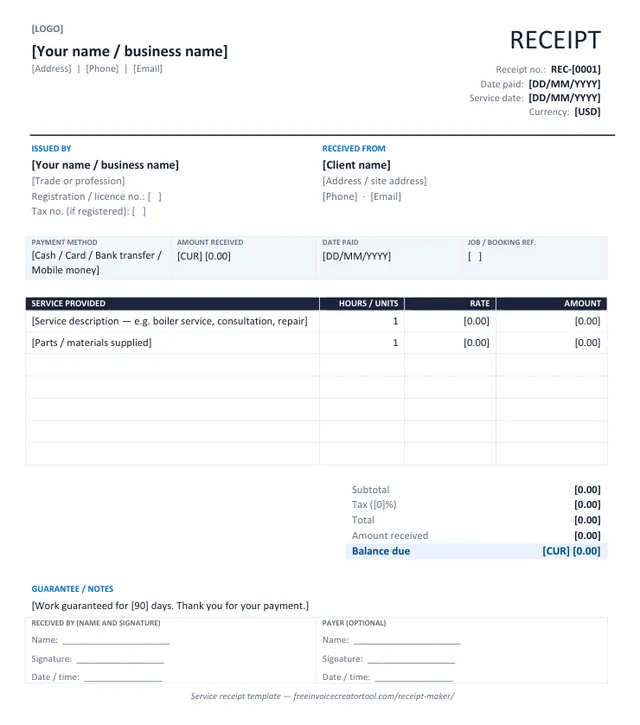
Preview of the service receipt template in Microsoft Word

Template 6 · Word .docx

Service receipt

For trades and professionals: service provided, hours or units, parts supplied, and a guarantee line.

  • Trade, licence and tax numbers
  • Service date and job reference
  • Service lines with hours or units and rate
  • Parts and materials line
  • Guarantee or warranty note
Download .docx

Customising in Word

Make a template yours in four steps

  1. Overwrite the bracketed text — business name, address, receipt number, date, currency — and delete the brackets.
  2. Insert your logo over the [LOGO] marker (Insert → Pictures, in line with text, about 3 cm high).
  3. Save it as your master copy (File → Save As → Word Template) so each new receipt starts with your details.
  4. Fill in the payment, type the totals, and Save As PDF before sending — a receipt should never go out as an editable file.

Full walkthrough, and the template-vs-generator comparison, on the receipt templates page.

Types

Types of receipt

The same document, adapted to what was paid for — from a simple receipt for one payment to an itemised sales receipt. The receipt maker above covers every type below; change the title and the payment method.

Payment receipt

The general case: confirms an invoice, bill or account was paid. Quote the invoice number so both ledgers close.

Cash receipt

When notes and coins change hands there is no bank record, so the receipt is the only evidence. State the amount in words as well as figures.

Sales / store receipt

Point-of-sale receipt for a shop, market stall, restaurant or online order: items, quantities, tax and how it was paid. Doubles as proof of purchase for returns.

Rent receipt

Rent received for a stated period and property. Tenants need it for deposits, references and in some places tax relief. See what a rent receipt must include.

Deposit / part-payment receipt

An instalment against a larger order. Shows the order total, what has been paid to date and the balance still due.

Service receipt

For trades and professionals: the service performed, parts supplied, and a guarantee line. Often issued on the spot after the job.

Refund receipt

Records money going back to the customer. Same fields, with the refund reason and the original receipt number.

Digital receipt / e-receipt

Any of the above as a PDF sent by email or message instead of paper. A digital receipt is what this tool produces; a printout is optional.

Itemised receipt (itemized)

Every line listed separately with its own price and tax, rather than one total. What an expense claim, a warranty return or a VAT reclaim needs, and the reason a card slip is usually not enough on its own.

Restaurant receipt

Covers, dishes, drinks, service charge and tax, with the table or order number. Service charge belongs on its own line — it is taxed differently from a tip left voluntarily.

Grocery / supermarket receipt

A long itemised list where the value is the detail: unit prices, quantities, any multi-buy discount applied, and tax split by rate where food and non-food are rated differently.

Courier / delivery receipt

Confirms goods handed over and paid for in one document, with the consignment reference. Pairs with the waybill that travelled with the shipment.

All of the above are the same document with different wording. Change the title and the payment method; nothing else needs to move.
Know the difference

Receipt vs invoice vs bill vs quotation

Four documents that get confused with each other. The important line is the first one: only a receipt confirms that money has been received.

Comparison of receipt, invoice, bill and quotation
FeatureReceiptInvoiceBillQuotation
Confirms paymentYesNoNoNo
Issued whenMoney is receivedWork is done or goods deliveredAt the point of sale, before paymentBefore the work, as an offer
Carries a due dateNoYesUsually “on receipt”A validity date instead
Shows payment methodYesAccepted methodsSometimesNo
NumberingOwn series (REC-)Own series (INV-)Often the invoice seriesOwn series (QUO-)
Created hereYesYes — invoice creatorYes — bill generatorOn Android — quotation maker

Full comparisons: invoice vs receipt · how to write a receipt · what counts as proof of payment

Receipts must be genuine

Issue receipts only for payments you have actually received, from your own business. Producing a document that appears to come from a shop, bank or company you do not operate, or for a payment that was never made, is fraud. This tool creates receipts for your own transactions and nothing else.

Practical

Receipt numbers, part payments and the invoice

Put the invoice number on the receipt and the receipt number against the invoice in your records. When a customer asks six months later whether an invoice was paid, that one habit turns an argument into a lookup.

How to write a receipt · Create the matching invoice

  • Keep receipt numbers in their own series. REC-001, REC-002 — never reuse the invoice number, so the two documents can never be confused.
  • Date it the day the money arrived, not the day of the sale. A bank transfer received on the 14th gets a receipt dated the 14th.
  • Always state the payment method. “Paid” is not much use later; “paid by bank transfer, ref. 4471” is.
  • For a deposit or part payment, show the full amount, what has been received and the balance due, so neither side loses track of what is left.
  • Keep your copy. Download the PDF to a folder per month or per customer; a receipt only helps you if you can find yours too.
  • Customers claiming expenses need their name on it. An expense receipt without the payer’s name is routinely rejected by employers and tax authorities.

An invoice and receipt generator in one app

Invoice & Quotation Generator creates receipts on Android using the customer and item details you already entered, so confirming a payment takes seconds rather than a fresh document, and every receipt is saved and exported as a PDF.

  • Receipts, invoices, quotations and waybills
  • Customer details reused across documents
  • Taxes, discounts and automatic totals
  • Export as PDF, print or share
  • Free, with unlimited documents
Get the Android app
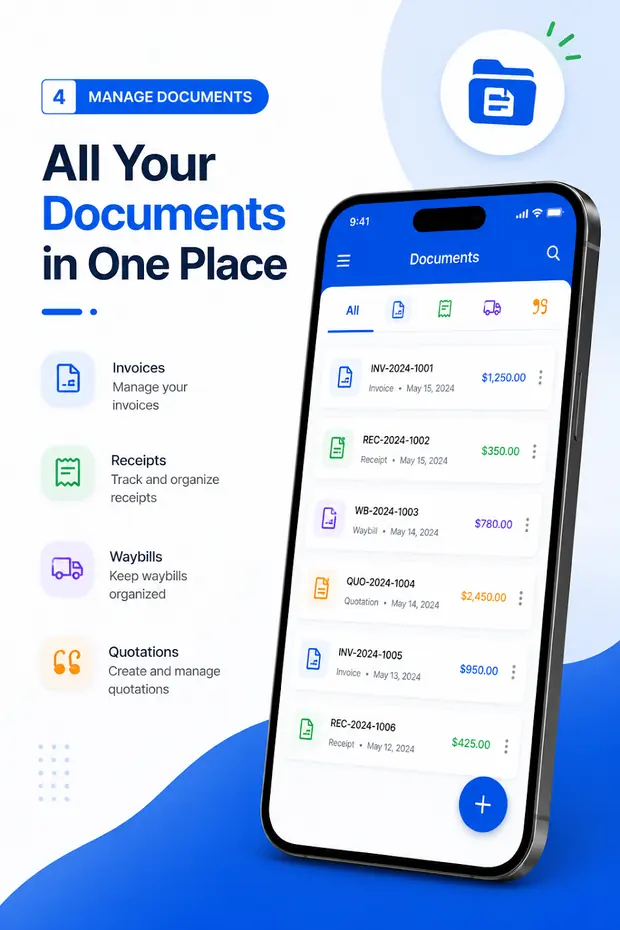
A list of invoices, receipts, waybills and quotations in the Android app

Questions

Receipt maker FAQ

What is a receipt?

A receipt is written confirmation that a payment has been received. It records who paid, how much, when, by what method and for what. Unlike an invoice it carries no due date, because once a receipt is issued nothing — or only a stated balance — is outstanding.

Can I create a receipt online for free?

Yes. This receipt generator is free and runs in your browser: fill in your business, the customer, the items and the payment, then download an A4 PDF or print it. There is no account, no login and no watermark, no limit on the number of receipts, and nothing you type is uploaded.

Is this a receipt creator or a receipt template?

Both. As an online receipt creator it fills in the layout, does the arithmetic and produces the PDF; because it remembers your business details in this browser, it also works as a reusable receipt template. If you want a file to edit in Word, download one of the six free receipt templates.

What is the difference between a receipt and an invoice?

An invoice asks for money; a receipt confirms it arrived. A sale paid on the spot may only need a receipt. A sale paid later needs an invoice first and a receipt afterwards. See invoice vs receipt.

Can I issue a receipt for a partial payment or deposit?

Yes, and you should. Enter the full amount of the sale in the items, type the amount actually received in Amount received, and the receipt shows the balance still due. The PAID stamp only appears when the balance reaches zero.

Do I need a receipt number?

Yes. A unique, sequential receipt number lets you match a payment to an invoice, answer a query months later and show a complete record if you are audited. Keep receipt numbers in their own series (REC-001, REC-002) separate from invoice numbers.

Can I make a cash receipt, rent receipt or sales receipt with this tool?

Yes. Change the title, pick the payment method and adjust the labels; the layout suits all of them. There are also six Word receipt templates — payment, cash, sales, rent, deposit and service — if you prefer an editable file.

Does the receipt show tax?

If you are registered for VAT, GST or sales tax, switch tax on in the settings and the receipt shows the tax amount and rate separately, which is what a customer needs to reclaim it. Rename the label to VAT, GST or whatever applies.

Can I use this as a blank receipt template?

Yes. Leave the fields empty, print the sheet, and you have a blank receipt to fill in by hand. Or keep it on screen: the generator remembers your business details in this browser, so each new receipt starts with them filled in.

Is this a receipt maker app?

The web tool works on any phone or computer. For a receipt maker app that saves customers and documents, Invoice & Quotation Generator creates receipts on Android alongside invoices, quotations and waybills. Get it on Google Play.

Receipt books

Replacing a paper receipt book

The duplicate book still works. Here is where it stops working, and what an online receipt book does differently.

A carbonised receipt book is a good system: pre-numbered, a copy for each side, no power required. It fails in three specific places, and they are the reasons people go looking for an online receipt book maker.

  • The copy is unreadable. Carbon under a ballpoint gives you a second sheet nobody can read in a year, which is exactly when you need it.
  • The book runs out mid-job. Usually on a Saturday. A numbered series that continues digitally does not.
  • Nothing is searchable. Finding one receipt from March means going through the book by hand.

Producing receipts here gives you the same numbered series with a legible PDF copy for both sides. Keep the paper book in the van for the times a customer wants something in their hand immediately — there is no reason to run one system exclusively.

Plain or branded

A simple receipt, or a customised one

Both are produced by the same tool. Which you want depends on who is reading it.

Simple receipt

Who paid, how much, what for, when, and a signature. Nothing else. For a one-off cash payment this is complete, and anything added is decoration.

Itemised receipt

Every line priced separately with its tax — an itemized receipt, in US spelling. What an expense claim, a warranty return or a tax reclaim needs, and what a total-only receipt cannot support.

Personalised / custom

A personalized receipt carrying your logo, business name, tax number and terms. Worth it when the receipt is a piece of customer-facing paper rather than just a record.

Official receipt

Where your regulator specifies a format or a serial series, follow that rather than this layout. Check the local rule before assuming a generic receipt qualifies.

Barcodes and till receipts

Said plainly, because it is a common ask: this is not a barcode receipt maker. It produces an A4 or A5 PDF, not a thermal till roll, and it does not print barcodes. For point-of-sale hardware you need a till system; for a document you email or hand over, this is the right shape.

Duplicate copy

Print two or keep the PDF. Both carry the same receipt number, which is what makes the pair reconcile later.

Nothing to install

Receipt software, on any device

People look for receipt maker software, a receipt generator program, receipt making software or a receipt app for a phone. They all want the same outcome: a correct, numbered receipt without retyping your details every time.

This page is that, running in the browser — on Windows, Mac, Linux, Android or an iPhone, with nothing to download, no licence and no per-receipt charge. It works on a locked-down work computer where installing software is not permitted, and it does not go stale when the machine updates.

The one real download is the Android app, which matters if you issue receipts away from a desk or with no signal. There is no iOS app, so there is no iPhone receipt generator to install; on an iPhone or iPad, use this page in Safari — the PDF download works the same way. The same applies to invoices, covered on invoice software.